
If you're in Maple Ridge and you've started wondering whether your next home might be a little further east, you're in good company. I hear this a lot from buyers in Albion, Silver Valley, Cottonwood, and West Maple Ridge who like the Fraser Valley lifestyle but want to see what their budget, lot size, or property options look like in Mission.
That move makes sense on paper, but Mission isn't just “Maple Ridge with a different postal code.” It has its own mix of neighbourhoods, lot types, commuter patterns, and buyer expectations. If you want to search efficiently, you need to treat the MLS as a working tool, not just a scrolling app. That's where a lot of buyers either save time or waste weeks.
Starting Your Mission Home Search from Maple Ridge
A common scenario looks like this. A Maple Ridge family has outgrown a townhome near schools and parks, likes the feel of the Fraser Valley, and starts asking whether Mission could offer more yard, more privacy, or a different type of home than what they've been seeing in familiar neighbourhoods. They're not trying to leave the region. They're trying to stretch their options without losing the lifestyle they already know.
That's a smart instinct. Mission often attracts buyers who already understand places like West Maple Ridge, where access, neighbourhood feel, and home style matter just as much as square footage. But once you start looking east, the search changes quickly. You're no longer comparing one or two small clusters of listings. You're sorting through detached homes, condos, townhomes, and acreages spread across a much wider range of settings.
According to REW's Mission listings area page, Mission has 501 homes for sale with a published price range from $129,000 to $7,999,999. That alone tells you casual browsing won't cut it. The spread is too wide, and the inventory is too varied.
Practical rule: If your first MLS search in Mission returns a giant mixed bag of condos, acreages, teardown candidates, and estate-style properties, the search isn't helping you. Your filters are too loose.
Why Mission requires a tighter search strategy
Maple Ridge buyers often start with a rough mental map. They already know where they'd prefer to be near schools, trails, shopping, or commuting routes. In Mission, many buyers don't yet have that same street-level familiarity, so they rely too heavily on listing photos. That's usually a mistake.
Mission's listing pool is large enough, and broad enough, that you need a repeatable system:
- Set a hard budget range first so upper-end and entry-level listings don't crowd the same results.
- Choose the property type early because detached homes, townhomes, condos, and acreage searches behave very differently.
- Narrow by area instead of searching all of Mission at once.
- Use up-to-date alerts because current inventory matters more than bookmarked listings from a few days ago.
What works better than browsing
The buyers who do this well usually start with needs, not dreams. They separate must-haves from nice-to-haves. They decide whether they're searching for a family home, a mortgage helper setup, downsizing space, or land. Then they use the MLS to test the market, not just admire it.
That approach matters in Mission because a broad search can look exciting while being almost useless. A disciplined one shows you where the genuine opportunities are.
Choosing Your Best MLS Search Platform
Where you search matters almost as much as how you search. Most buyers start with a national portal because it's familiar, and that's fine. But once your Mission search gets serious, platform choice affects how quickly you can sort listings and how well you understand what you're seeing.
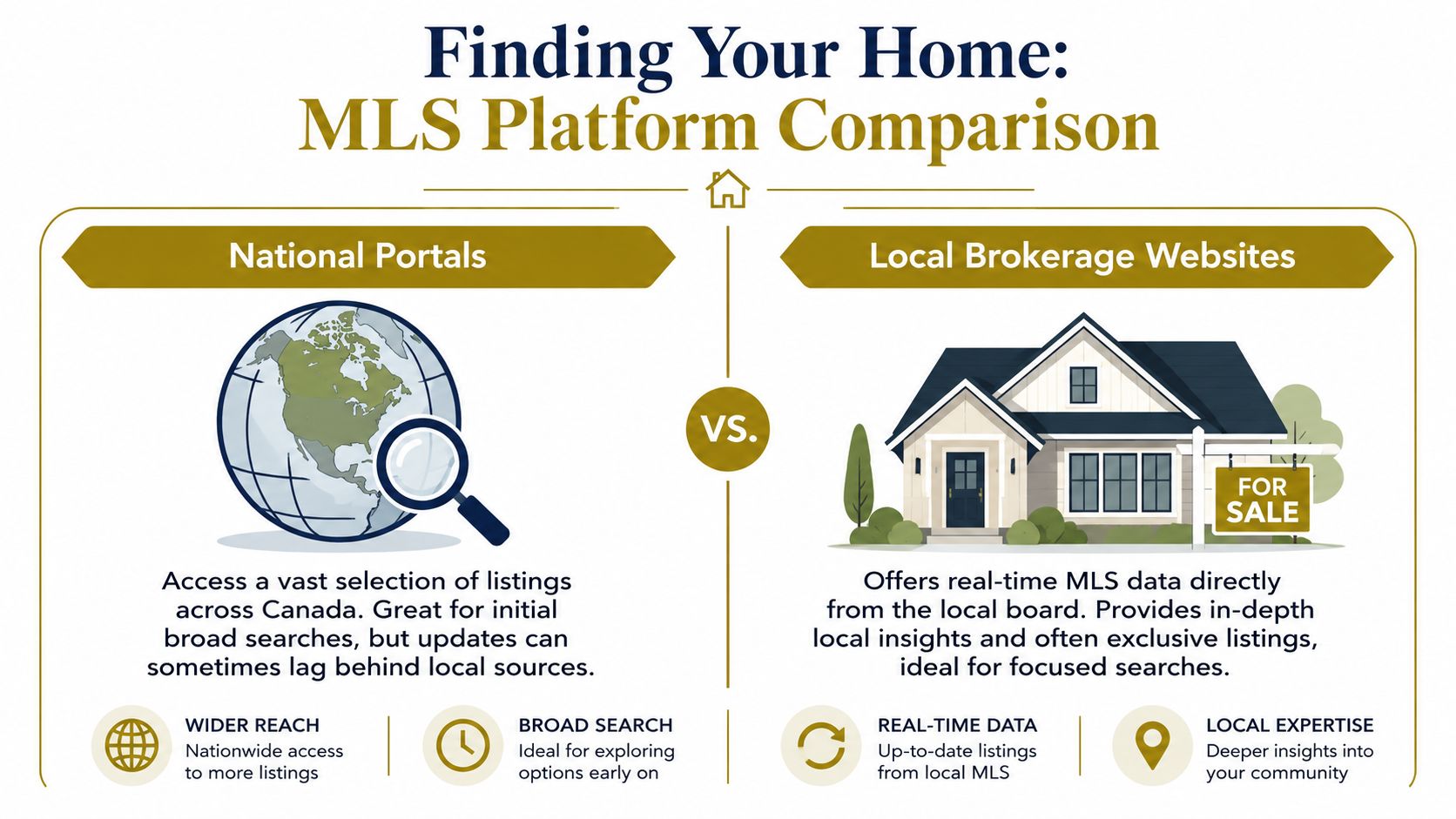
National portals versus local brokerage sites
Here's the practical difference.
| Platform type | Usually best for | Main limitation |
|---|---|---|
| National portals | Broad first-pass searching across multiple communities | Less local context when you need to judge the listing properly |
| Local brokerage websites | Focused searching once you know you're serious about Mission | Depends on the quality of the site and the local guidance behind it |
A large portal can be useful when you're comparing Mission to Maple Ridge, Pitt Meadows, or Abbotsford at the same time. It gives you range. You can search quickly, scan photos, and get a general feel for inventory.
A local brokerage website often becomes more useful once you've moved past “just looking.” If the site has an MLS-powered search, neighbourhood focus, and a direct line to someone who knows the Fraser Valley, it usually helps you interpret the results instead of just displaying them. One example is the home search tools available through Royal LePage Brookside Realty Property Management, which are designed around local MLS-style searching rather than general real estate browsing.
What public listing pages don't explain well
Many buyers find themselves tripped up. Public portals tend to make listings look uniform. They aren't. Some are easier to view than others. Some statuses matter more than buyers realise. Some properties look comparable in photos but sit in very different market segments once you factor in lot type, access, or listing participation.
A Mission MLS-based page noted that listings are held by participating firms and marked with the MLS® logo, and that current Mission price points start at $349,900 upward on that search set, as shown on this Mission property search page. That's useful because it reminds buyers that what appears in public search results is shaped by participation, status, and coverage, not just by what seems available at a glance.
Don't assume two Mission listings are equally available, equally current, or equally comparable just because they show up side by side online.
Best use for each platform
Use a national portal when you're doing the first round of comparison shopping.
Use a local MLS-powered site when you want to answer practical questions like these:
- Is this listing active or just lingering in my saved results
- Am I comparing similar homes or completely different property classes
- Is this part of Mission where I'd want to live day to day
- Can I move from searching to booking a showing without extra friction
If you're trying to figure out how to search for homes on MLS in Mission BC without getting buried in noise, start broad, then switch quickly to a platform that helps you search with local context.
Using Search Filters to Find Your Ideal Home
Mission punishes lazy filters. That's the blunt version.
When published portals show 501 homes for sale with prices ranging from about C$129,000 to C$7,999,999, as noted on this Mission listings search page, an unfocused search creates a result set that's too large to evaluate properly. The right workflow starts with location, price, property type, bedrooms, and status, then gets tighter from there.

Start with the non-negotiables
Buyers often begin with features they hope to find. Reverse that. Start with what would disqualify a home.
If you need a detached house, don't leave condos and townhomes in the mix. If you need a suite setup, don't search as though any basement will do. If your budget has a hard ceiling, respect it early.
A cleaner first pass usually includes:
- Area selection. Search only the parts of Mission you'd realistically consider.
- Price range. Leave room for flexibility, but don't search the whole spectrum.
- Property type. Detached, condo, townhome, or acreage.
- Bedrooms and bathrooms. Enough to avoid obvious mismatches.
- Status. Active only, unless you're reviewing sold comparables separately.
Use the map like a working tool
Many Maple Ridge buyers find their search improves fast. In familiar areas, they already know the difference between “close enough” and “wrong location.” In Mission, that clarity comes from map work.
Map search is useful when you want to stay closer to schools, major roads, established neighbourhood pockets, or specific lifestyle priorities. It's also the fastest way to remove listings that technically fit your criteria but sit in a location that doesn't.
For some buyers, that means drawing tighter boundaries around practical daily routines. For others, it means expanding outward because they want more land or separation than Maple Ridge has offered them.
If larger estate-style options are part of your search, it can also help to review a more targeted category like Mission luxury homes instead of forcing those properties into a standard detached search.
A good filter saves more time than a good photo gallery. Photos create interest. Filters create decisions.
Add keyword and list-view screening
Once the core filters are set, keyword searching becomes useful, allowing buyers to uncover listings that don't stand out in thumbnail view.
Useful keyword examples include:
- Suite-related terms if you need flexibility for family or income
- Workshop if storage or hobby use matters
- View if outlook is a real priority
- Rancher if stair-free living matters
- Acreage when lot size matters more than house finish
Then switch from map view to list view and compare the results in sequence. Don't just click the prettiest one. Scan the details in order and ask whether each listing earns a showing.
A quick visual walkthrough can help when you're setting up your search process:
A practical shortlist method
For a buyer looking for, say, a three-bedroom home with suite potential, I'd narrow the search into three buckets:
| Bucket | Meaning | What to do |
|---|---|---|
| Strong fit | Meets location, budget, and layout needs | Book quickly |
| Possible fit | Right area, but one compromise | Keep on shortlist |
| False positive | Looks good in photos, weak on basics | Remove immediately |
That system sounds simple because it is. The mistake is letting every decent listing remain “maybe.” In Mission, that creates a messy shortlist fast.
How to Decode a Mission MLS Listing
Once you've narrowed your search, the essential work starts. A listing isn't just photos, a price, and a catchy write-up. It's a compressed summary of what the seller wants you to notice, what the MLS requires them to disclose publicly, and what still needs verification.
One local Mission MLS search page states that buyers can search by Address, Postal code or MLS® Number and browse detached homes, condos, townhomes, and acreage, while REALTOR.ca shows 508 Mission listings with prices starting at $129,000, as noted on this Mission home search page. That matters because once inventory is that broad, reading listings casually stops being effective.

Read the listing in layers
Most buyers read top to bottom. I prefer to read a listing in layers.
First, scan the basics. Price, property type, address, and key specs. Then ignore the marketing language for a moment and look at the structural details. Does the layout match your needs? Is the lot style consistent with how you want to live? Is the location stronger than the house, or is the house carrying a weaker location?
Then go back and read the remarks carefully. That's where agents signal both strengths and soft spots.
What the remarks often reveal
Certain listing phrases deserve a second look, not because they're bad, but because they're loaded.
- “Great opportunity” can mean potential, but it can also mean work.
- “Mortgage helper” may indicate suite flexibility, but you still need to verify the setup.
- “Move-in ready” is subjective.
- “Private yard” may be accurate, but photos can hide slope, proximity, or usability.
- “Room for the family” doesn't automatically mean the layout functions well.
This is also the stage where buyer education matters. If you're still early in the process, a practical guide to buying a home helps you connect the listing details to financing, conditions, and next steps.
The strongest listings answer your questions before you ask them. Weak listings make you work to fill in the blanks.
What to question before booking
A good Mission listing should push you toward better questions, not instant conclusions.
Use this checklist before you book:
- Check the location fit. Is it close to what matters to you, or just within city limits?
- Study the photo sequence. What isn't shown?
- Read for missing detail. If key spaces aren't described, ask why.
- Assess the lot realistically. Flat usable yard and visually large lot aren't always the same thing.
- Match the listing to your actual plan. Family living, multigenerational use, commuting, downsizing, and investment all require different reads.
Precision beats scrolling
If you already have a target property from a sign, text, or recommendation, stop searching broadly and search directly by address, postal code, or MLS number. That's faster, cleaner, and less prone to error than trying to “find it again” through a general results page.
That's one of the clearest differences between browsing and shopping. Browsing is emotional. Precision is how buyers stay organised.
Setting Up Alerts and Arranging Showings
Once your filters are right, saved searches do the heavy lifting. This is the point where buyers stop chasing the market and start letting the right listings come to them.
A clean alert is better than a busy one. If your search alert is too broad, you'll stop reading it. If it's precise, you'll know immediately when something worth seeing lands in your inbox.
Build alerts that you'll actually trust
Set up one primary alert for your ideal search, then one or two secondary alerts for adjacent options. Keep each one distinct.
For example:
- Primary search for your exact property type, budget, area, and minimum bedroom count
- Secondary search for a slightly wider area if location flexibility exists
- Special-use search for something specific like suite potential, acreage, or downsizer-friendly layouts
If you already know the exact property you want to revisit, searching by MLS number or exact address is the fastest high-confidence method. MLS systems are designed to return a single record for that identifier, and MLS navigation training also points out that users can search by address or MLS number and then use map-based verification to catch issues like wrong city filters, incomplete street typing, or missing status constraints, as shown in this MLS navigation video.
Don't book showings the hard way
Buyers sometimes see a listing online and contact the listing agent directly because it seems faster. It usually isn't better.
When your own buyer's agent arranges the showing, you start with representation that is aligned with your side of the deal. You also get help screening whether the property is worth your time before you drive out, especially if you're coming from Maple Ridge and trying to organise multiple Mission showings efficiently.
A simple showing process works best:
- Send the exact listing you want to see.
- Include your availability and any deal-breaker questions.
- Ask for context before the appointment so weak candidates can be removed.
- Group showings sensibly if you're viewing several homes in Mission on the same day.
If you want help setting up alerts or arranging a focused tour route, use the Brookside contact page and send over the search criteria you've already tested.
A showing should confirm a shortlist, not create one. If you're touring homes that never matched your criteria properly, the search stage needs work.
Why a Local Expert Is Your Best Advantage
The MLS is excellent at showing inventory. It's not excellent at judgement.
It won't tell you whether a Mission property only looks good because the photos are strong. It won't tell you if the location will feel wrong on a weekday morning. It won't tell you when a listing is technically interesting but unlikely to suit your actual plan.
That's where local guidance matters. A Maple Ridge realtor who understands both sides of the bridge can help you compare Mission opportunities through the lens of how Fraser Valley buyers really live, commute, and choose neighbourhoods. That context saves time, sharpens your shortlist, and helps you avoid expensive enthusiasm.
If you're weighing whether Mission is the right move, it also helps to see how other clients describe the process and the value of having representation with local perspective. You can browse client testimonials to get a sense of that experience.
If you're comparing Maple Ridge and Mission and want a practical, no-pressure conversation about your next move, Royal LePage Brookside Realty Property Management can help you sort through the search, narrow the right areas, and move from online browsing to a confident purchase plan.